


RTK Base Station Without a Radio Link: GSM 1+1 Setup
APEKS GNSS receivers carry three datalinks in one housing: a UHF radio, WiFi, and a full-band 4G module with a Nano-SIM slot. GSM 1+1 means using the 4G module instead of the radio: the base pushes corrections to an NTRIP caster and the rover pulls them back. On the base, set Datalink to Device Internet with network mode SIM, then enter the caster address, port, account, password and Base Access Point. On the rover, set Datalink to Phone Internet with connecting mode NTRIP, enter the same values, tap Get and pick the published stream. The radio hardware is still inside both receivers; it is simply not the link in use.
- 1. What the Radio Can and Cannot Do
- 2. Three Datalinks in One Receiver
- 3. The Base Side: Base Mode Settings Field by Field
- 4. The Rover Side: Rover Mode Settings Field by Field
- 5. Base Access Point vs Mountpoint: the Two Fields That Trip People Up
- 6. What GSM 1+1 Actually Means
- 7. Distance and Accuracy: What Changes and What Does Not
- 8. Bringing the Link Up in Order
- 9. FAQ
The usual way to run RTK is a base station broadcasting corrections over a UHF radio to one or more rovers nearby. It works well within its envelope and adds no data cost, which is why it remains the default in most markets. But the envelope is narrower than the size of many sites, and when a crew walks out of range the receiver does not warn anyone clearly — it simply stops receiving corrections and starts degrading.
A second path exists inside the same receiver, and it is the one most crews never configure. APEKS GNSS receivers also carry a full-band 4G module with a Nano-SIM slot and a WiFi data link. Using the cellular module to carry corrections through an NTRIP server instead of through the radio is what the field calls GSM 1+1.
This guide sets out what the hardware actually supports, walks through both settings screens field by field, and is specific about what the change buys and what it does not.
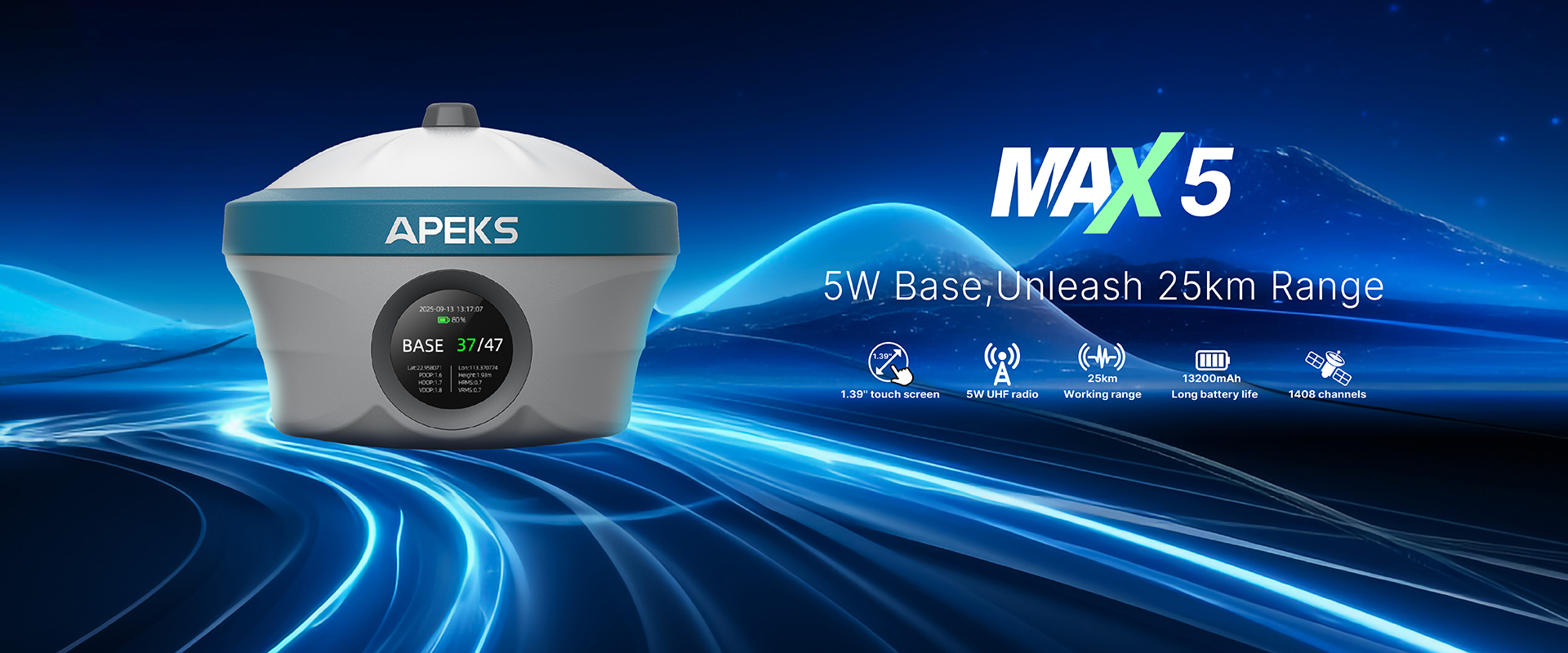
Radio range, transmit power, cellular band support, SIM form factor and data format figures in this guide are taken from the published product specifications for the AP10, AP20, AP20AR, AP30, AP40, AP50, AP60, AP80 and MAX5. Field names and values in the settings tables are taken from the Base Mode Settings and Rover Mode Settings screens of the APEKS receiver software. Server addresses and credentials in illustrations are examples.
1. What the Radio Can and Cannot Do
Start with the published numbers, because they define the problem better than any description of terrain does.
| Model group | UHF radio | Working range | Protocols |
|---|---|---|---|
| AP10, AP20, AP20AR, AP30, AP50, AP60 | 2 W Tx/Rx, 410–470 MHz | 8–15 km in ideal environments | TT450, TRIMMARK3, SOUTH, LoRa; link rate 9600 to 19200 bps |
| AP40, AP80 | 2 W Tx/Rx, 450–470 MHz | 8–15 km in ideal environments | TT450, TRIMMARK3, SOUTH, LoRa; link rate 9600 to 19200 bps |
| MAX5 | 5 W Tx/Rx, 410–470 MHz | 25 km in ideal environments with LoRa and 5 W | TT450, TRIMMARK3, SOUTH, LoRa; link rate 9600 to 19200 bps |
Read the qualifier carefully: ideal environments. A published range assumes clean line of sight and no obstruction. In practice a base on a hilltop feeding a crew in a valley, or a base at the edge of a site with a treeline between it and the work area, will not deliver the quoted figure. The range that matters is the one you get on the day.
Two things follow. First, on the AP10, AP20, AP20AR, AP30, AP50 and AP60 the published envelope is generous for a single site and not generous at all for a long corridor project, a large open-pit operation, or a crew that needs to work on both sides of a ridge. Second, the failure is quiet. The receiver keeps tracking satellites; what it loses is the correction stream, and an RTK rover without corrections degrades rather than stopping outright. That is why crews sometimes discover the problem only at the point of checking a closure.
The MAX5 extends the radio envelope to 25 km with 5 W and LoRa, which is a meaningful improvement, but it is still a radio envelope with the same physics behind it. Doubling the range does not remove the constraint; it moves it further out.
2. Three Datalinks in One Receiver
This is the part that surprises people, and it is why GSM 1+1 is a configuration choice rather than a hardware purchase.
| Datalink | Official specification | When it makes sense |
|---|---|---|
| UHF radio | As specified per model; see the model table in section 1 | Site work within range, no data plan wanted, line of sight available |
| WiFi | 802.11b/g/n/ac, hotspot and data link mode, accessible via Wi-Fi | Fixed site with WiFi coverage, or configuring the receiver from a phone or tablet |
| 4G cellular | Integrated full frequency multi-band 4G modem supporting LTE-TDD, LTE-FDD, WCDMA, CDMA2000, UMTS, HSPA+, GSM, GPRS and EDGE; 1x SIM card slot supporting Nano-SIM | Work areas beyond radio range, split sites, or any job where terrain blocks the radio path |
All three are fitted to the AP10, AP20, AP20AR, AP30, AP40, AP50, AP60, AP80 and MAX5. They are alternatives, not additions — you select one datalink for the job rather than paying for a separate radio or cellular version of the receiver.
That changes how the decision should be framed. This is not "buy the internet model instead of the radio model". It is "the receiver you already own can be pointed down a different path". A crew that switches from radio to cellular for a particular site has not changed equipment and has not bought anything.
The WiFi link deserves a word of its own because it is the one most often overlooked. On a site with fixed WiFi coverage — a mine office network, a permanent construction compound, a port — the receiver can carry its correction stream over WiFi with no SIM and no data cost at all. It is the cheapest of the three and the least used.
One behavior on the WiFi path catches people out, and it is worth knowing before the crew travels.
When the base is switched onto a WiFi data link, the receiver stops serving the connection you were configuring it from. That disconnection is the expected result of the change, not an error to chase. Treat the drop as confirmation the setting took effect, then check the result from the rover side instead of trying to reconnect to the base.
That second point is where crews lose the most time. The instinct is to assume the link failed and start over from the base, when in fact the base has done exactly what it was told. Password length is the other silent failure on this path — long passphrases entered into a receiver are a frequent reason a network simply never joins, so keep the site credential within what the configuration field accepts or use a dedicated SSID for the base.
3. The Base Side: Base Mode Settings Field by Field
The base screen is where the corrections originate, so it is worth reading top to bottom rather than jumping to the datalink block. The upper half governs what the corrections contain; the lower half governs how they travel.
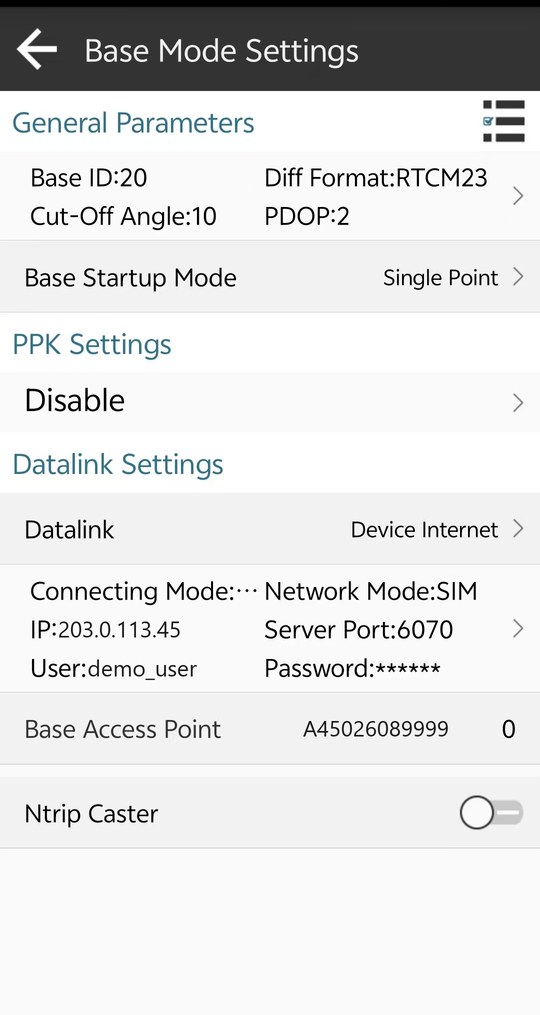
The actual Base Mode Settings screen for an internet datalink on an APEKS receiver. Server address, account and Base Access Point values in this illustration have been replaced with examples; the field names, the Device Internet selection and the Network Mode SIM line are as they appear on the device.
| Group | Field | Value in the internet configuration | What it controls |
|---|---|---|---|
| General parameters | Base ID | 20 | Identifier the base attaches to its correction messages |
| General parameters | Diff Format | RTCM23 | Differential message format; the receiver supports RTCM 2.X and RTCM 3.X |
| General parameters | Cut-Off Angle | 10 | Elevation mask in degrees; satellites below it are excluded from the solution |
| General parameters | PDOP | 2 | Position dilution of precision threshold applied to the base solution |
| General parameters | Base Startup Mode | Single Point | How the base establishes its own position at start-up |
| PPK Settings | PPK | Disable | Post-processing mode switched off for real-time work |
| Datalink Settings | Datalink | Device Internet | Transport used to carry corrections off the base |
| Datalink Settings | Connecting Mode | Network Mode: SIM | Which network path the receiver uses for that transport |
| Datalink Settings | IP / Server Port | Caster address and port | Where the corrections are pushed |
| Datalink Settings | User / Password | Caster account credentials | Authentication with the caster |
| Datalink Settings | Base Access Point | Stream identifier | Name under which the base registers its stream |
| Datalink Settings | Ntrip Caster | Toggle | Enables the caster relationship for the base stream |
Note what the Diff Format row does and does not say. The screen shows RTCM23 as the selected option; the published data format specification for these receivers lists RTCM 2.X and RTCM 3.X, together with RINEX, NMEA 0183, VRS and NTRIP. If your caster or your rover requires a specific revision, check what the other end expects rather than assuming the label settles it.
Two fields deserve comment because they are frequently left at defaults without thought. Base Startup Mode set to Single Point means the base derives its own position from the satellites rather than from a surveyed coordinate; that is normal for a rapid deployment, and it means the whole project is referenced to that self-determined position. Where absolute accuracy against a published datum matters, the base coordinates should be entered or derived from a known point instead. The cut-off angle value shown on the screen is a reasonable general-purpose setting; raising it in an obstructed urban site can help reject multipath-prone low satellites, at the cost of a thinner solution.
4. The Rover Side: Rover Mode Settings Field by Field
The rover screen mirrors the base but is not a copy of it, and the differences carry meaning. The rover has fewer general parameters, a mountpoint selector the base does not have, and a data status panel that tells you whether corrections are actually arriving.
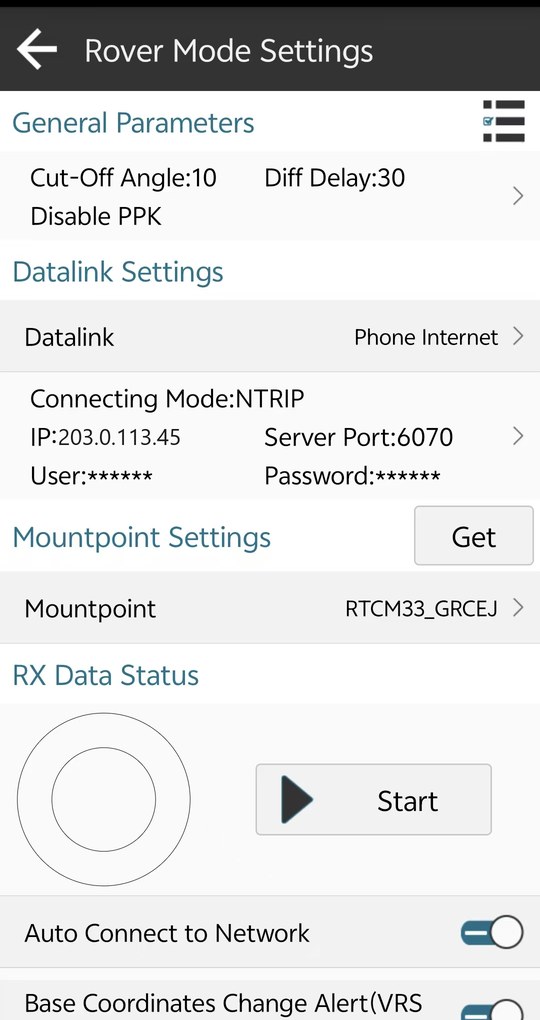
The matching Rover Mode Settings screen. Two differences from the base screen matter: the Get button that queries the caster for its mountpoint list, and the RX Data Status panel that confirms whether corrections are actually arriving.
| Group | Field | Value in the internet configuration | What it controls |
|---|---|---|---|
| General parameters | Cut-Off Angle | 10 | Elevation mask applied to the rover's own satellite set |
| General parameters | Diff Delay | 30 | Age of corrections the rover will still accept before treating the stream as stale |
| General parameters | PPK | Disable | Post-processing mode switched off for real-time work |
| Datalink Settings | Datalink | Phone Internet | Transport used to pull corrections into the rover |
| Datalink Settings | Connecting Mode | NTRIP | Protocol used over that transport |
| Datalink Settings | IP / Server Port | Same caster address and port | Where the corrections are fetched from |
| Datalink Settings | User / Password | Same caster credentials | Authentication with the caster |
| Mountpoint Settings | Get | Button | Queries the caster and returns the list of available streams |
| Mountpoint Settings | Mountpoint | Selected stream name | Which published stream the rover subscribes to |
| RX Data Status | Start | Button | Begins receiving and shows whether data is arriving |
| Connection behavior | Auto Connect to Network | Toggle | Re-establishes the connection without manual intervention |
| Connection behavior | Base Coordinates Change Alert (VRS only) | Toggle | Notification relevant to virtual reference station services |
The two datalink names differ for a real reason. Device Internet means the receiver uses its own 4G module and the SIM you inserted. Phone Internet means the connection comes from a phone or controller instead. Both are internet transports; the distinction is whose SIM is doing the work. Note that the AP10 through AP80 all carry their own Nano-SIM slot, so most of these receivers can be online independently — the phone route exists for handheld models that have no SIM slot, such as the APS1, which ships with Bluetooth and a Type-C port only.
Diff Delay is the field most often misunderstood. It sets how old a correction may be before the rover stops trusting it, and a value of 30 is generous enough to survive ordinary cellular jitter but tight enough to reject a dead stream. Setting it very high to "make it work" does not make the stream healthy; it only delays the moment the rover admits it is not.
The Auto Connect to Network toggle is worth leaving on for production work. A cellular link that drops and recovers silently is common on a moving site, and manual reconnection every time it happens turns into lost time and, worse, into a crew that does not notice the fix quality changing.
5. Base Access Point vs Mountpoint: the Two Fields That Trip People Up
This is where most setups stall, and it is worth treating as a section rather than a footnote because the two fields sit on different screens and carry different names for what feels like the same thing.
| Question | Base Access Point | Mountpoint |
|---|---|---|
| Where it is set | Base Mode Settings, Datalink Settings | Rover Mode Settings, Mountpoint Settings |
| What it names | The stream as the base registers it with the caster | The stream as the caster lists it to subscribers |
| Who assigns it | You, or your caster provider's convention | The caster, from whatever the base registered |
| How to obtain it | Typed into the base before Start Base | Retrieved with the Get button, then selected |
| Typical failure | Name collides with another base on the same caster | Name typed by hand and mistyped, or not yet listed |
The relationship is not always a one-to-one copy of a chosen string. Setting the Base Access Point to the receiver's own serial number is the common convention, and it is a good one: the serial number is unique to your unit, it is printed on the housing, and it removes any temptation to reuse a name that is already taken on the caster. But a convention is not a rule. Depending on how the caster is configured, the name a base registers under and the mountpoint a subscriber sees can still differ — the caster may present the stream under its own naming, for example pairing a format label with an identifier. That is precisely why the rover has a Get button instead of requiring a typed name.
On a caster you do not control, this matters more than on your own. A professional CORS service carries streams from many unrelated bases, so the list that Get returns is not your private namespace — it is everybody's. Select by matching your own identifier rather than by position in the list or by whichever name looks most familiar.
The practical rule that follows is short: set the Base Access Point to the serial number, then do not type the mountpoint by hand. Start the base, confirm it has registered, then use Get on the rover and select the stream from the list the caster returns. Typing a name from memory is the single most common cause of a rover that authenticates successfully and still never fixes, because the credentials were right and the stream name was not.
If Get returns a list and your stream is not in it, the problem is on the base side, not the rover side. Check that the base has actually started rather than merely saved, that its Ntrip Caster relationship is enabled, and that its Base Access Point does not duplicate another stream already registered under the same account.
6. What GSM 1+1 Actually Means
The name needs unpacking, because it appears in dealer conversations and in customer questions but nowhere in the published specifications.
The "GSM" part is loose terminology for the cellular path. Strictly, the module fitted to these receivers is a full-frequency multi-band 4G modem supporting LTE-TDD, LTE-FDD, WCDMA, CDMA2000, UMTS, HSPA+, GSM, GPRS and EDGE. GSM is one legacy mode inside that list, not the name of the feature. What you actually select on the device is Device Internet with network mode SIM, and the SIM is a Nano-SIM in the slot on the receiver body.
The 1+1 part refers to the one base plus one rover arrangement — a single reference point serving a single rover through a server, as distinct from a network service that many unrelated users share.
One decision sits underneath all of this and is easy to skip: does a caster have to exist as a separate server, or can the base be the caster? Both arrangements are normal in NTRIP practice, and they lead to different values in the same fields.
| Arrangement | What the IP and port point at | What you need |
|---|---|---|
| Base publishes to a caster you subscribe to | The caster provider's address and port | An account with that provider, and outbound data on the base |
| Base serves rovers itself | The base's own reachable address and port | A way for the rover to reach the base, plus credentials you define |
The two are not interchangeable in practice. The first gives you a stream that any rover with the right credentials can pull from anywhere it has internet, which is what makes one base usable across a scattered crew. The second removes the third-party dependency entirely, but the rover must be able to reach the base, so it suits a site where both ends share a network.
The Ntrip Caster toggle on the base screen is the field that sits at this decision. Before you fill in an address, be clear about which of the two you are building, because entering a caster address while the toggle is set for the other arrangement produces a base that looks configured and never publishes.
| What people say | What it maps to on the device |
|---|---|
| GSM mode | Datalink set to Device Internet, Connecting Mode set to Network Mode: SIM |
| 1+1 | One base publishing to a caster, one rover subscribing to that stream |
| No radio needed | Radio hardware present but not selected as the datalink |
Understanding this mapping is what lets a crew follow a dealer's verbal instruction and still find the right toggle. It also prevents the misconception that a GSM-specific hardware option has to be purchased or enabled somewhere — the module is already in the receiver.
Three practical consequences follow from using the cellular module as the datalink.
A radio base has to be placed where its signal reaches the working area, which is why it usually ends up on the highest accessible point in the middle of the site. An internet-connected base can be placed wherever the point is good, the sky view is open and power is available — including a fixed rooftop or a benchmark some distance from the day's work.
Because the connection is many-to-one through the caster rather than one-to-one through a radio, additional rovers that authenticate to the same account and select the same mountpoint receive the same corrections. The radio equivalent would require each rover to be within range of the same transmitter.
Correction streams are modest but continuous. Over a full working day the base is pushing and each rover is pulling without pause, so a data allowance sized for occasional phone use is the wrong allowance. Check the plan before the first production day rather than during it.
One point of vocabulary is worth settling, because it causes confusion when crews compare notes across countries. A site with only basic coverage will still carry a correction stream, since the payload is small; what it will not tolerate is a connection that keeps dropping, because every drop costs re-convergence time.
7. Distance and Accuracy: What Changes and What Does Not
This is the section that decides whether the setup is described honestly. Two different things get called "range" in RTK conversations, and the cellular datalink changes only one of them.
| Constraint | Radio datalink | Cellular datalink |
|---|---|---|
| Link reach | Bounded by the UHF specification of the particular model, as quoted in section 1 | Bounded by cellular coverage at both ends and reachability of the caster |
| Line of sight | Required in practice | Not required |
| Baseline length | Usually short, because the link fails before the baseline becomes the limit | Can be long, but accuracy still degrades with distance |
| Atmospheric error | Small, because baselines are short | Grows with baseline; this becomes the real limit on accuracy |
| Latency | Low and consistent | Higher and more variable, which is why Diff Delay matters |
The link and the baseline are separate constraints. A cellular datalink removes the link constraint almost entirely. It does not remove the baseline constraint, because the rover is still solving relative to the base, and the atmosphere above two points far apart is not the same atmosphere.
What this means in practice is that the cellular datalink turns a hard limit into a softer one. You are no longer stopped by a ridge or a treeline at fifteen kilometers. You are still limited by how far you can push a single-baseline RTK solution before ionospheric and tropospheric decorrelation between base and rover starts to cost accuracy.
That remaining limit is a property of single-baseline RTK rather than a figure from the APEKS specification, and it is worth being clear about the distinction. The UHF working ranges quoted in section 1 are the manufacturer's figures for the link. How far you can push the baseline for a given accuracy is a surveying judgement that depends on ionospheric conditions, time of day, satellite geometry and the accuracy your deliverable requires.
So the honest description of the benefit is operational freedom, not unlimited working range. A crew that understands the difference will place the base sensibly, keep an eye on the baseline, and re-establish a closer base when the project moves far enough. A crew that was sold "unlimited range" will eventually produce a survey whose error budget nobody can explain.
Latency deserves the same honesty. Cellular paths are longer and less predictable than a direct radio link, which is why the rover has a Diff Delay setting at all. A value of 30 tolerates ordinary variation. If you find yourself raising it repeatedly, the correct diagnosis is a poor connection, not an insensitive setting.
8. Bringing the Link Up in Order
The order matters, because each step produces something the next step depends on. Working out of order is how a setup ends up with correct credentials, correct settings and no fix.
One prerequisite belongs before all of them: check the firmware version on both receivers and bring them up to date. Datalink behavior, and particularly the WiFi and caster handling, is the part of the firmware that changes most between releases. A crew that spends an afternoon debugging a network base on an old build is usually debugging a version that has already been fixed. Record the version you tested on and the version you shipped with, so the next person has a baseline.
Set up the receiver on the known point or chosen location, enter the antenna height, and confirm the general parameters you want — cut-off angle, differential format, and whether the base determines its own position or uses entered coordinates. Nothing downstream is meaningful until the base solution is sound.
With the Nano-SIM inserted, set Datalink to Device Internet and network mode to SIM, and confirm the receiver has attached to the network. Do this before entering caster details so that a failed connection is not mistaken for a failed authentication.
Enter the caster address and port, the account and password, and the Base Access Point, then enable the Ntrip Caster relationship and start the base. The stream exists from this moment, not before it.
On the rover, set Datalink to Phone Internet and connecting mode to NTRIP, enter the same address, port and credentials, then use Get and select your stream from the returned list. If your stream is absent, return to the base rather than guessing at the rover.
Start RX data and watch the status while stationary. A fix obtained on a stationary rover that disappears as soon as the crew walks is a sign of a marginal connection, not of a bad sky view. Enable Auto Connect to Network so a drop recovers without intervention.
Note whether the base used a self-determined single point position or entered coordinates, and what datum and projection the deliverable requires. In this mode the transport is over the internet, but the reference frame question is exactly the same as with a radio.
The pattern is that three of the six steps are about the base and only two concern the rover. That ratio is worth remembering when something fails, because the instinct to keep fiddling with the rover is usually wrong: a rover that authenticates but never fixes is nearly always reporting a problem upstream.
9. FAQ
Does the receiver still have a radio if I use GSM 1+1, and what exactly is the 4G module?
Yes - the UHF radio is fitted to the same housing and stays available. On 2 W models it is specified for 410-470 MHz with a working range of 8-15 km in ideal environments, or 450-470 MHz on the AP40 and AP80; the MAX5 runs 5 W at 410-470 MHz with a working range of 25 km using LoRa. Meanwhile the cellular part is an integrated full frequency multi band 4G modem supporting LTE-TDD, LTE-FDD, WCDMA, CDMA2000, UMTS, HSPA+, GSM, GPRS and EDGE, with a Nano-SIM slot. GSM is one legacy mode inside that list rather than the name of the feature. Selecting Device Internet with Network Mode SIM changes which link carries the corrections; it removes neither the radio nor the ability to switch back for a job where radio is the better fit.
Do I need a third-party caster, or can the base act as one?
Both arrangements exist in NTRIP practice. If the base publishes to a caster you subscribe to, the IP and port you enter are the provider's, and any rover with the right credentials can pull the stream from anywhere it has internet. If the base serves rovers itself, the address you enter is the base's own reachable address and you define the credentials. The Ntrip Caster toggle on the base screen sits at this decision, so settle which arrangement you are building before entering an address - otherwise the base can look configured and never publish.
Why does the rover screen say Phone Internet if the rover has its own SIM slot?
Because the two labels describe whose connection is being used, not which receivers are capable of going online. Device Internet means the receiver's own 4G module and the SIM you inserted; Phone Internet means the connection comes from a phone or controller instead. The AP10 through AP80 each carry their own Nano-SIM slot and can be online independently. The phone route matters for handheld models that have no SIM slot, such as the APS1, which ships with Bluetooth and a Type-C port only.
Is the mountpoint on the rover the same as the base serial number?
Not necessarily, and this is where many setups fail. The Base Access Point is the name the base registers with the caster; the mountpoint is the name the caster lists to subscribers, and depending on how the caster is configured these can differ - it may present the stream under its own naming that pairs a format label with an identifier. That is why the rover has a Get button. Use Get, read the returned list, and select the stream rather than typing a name from memory.
How far can the rover work from the base in this mode?
The link itself is no longer bounded by the UHF radio figures, because it runs over cellular coverage and reaches the caster rather than the rover directly. Accuracy is a separate matter. The rover still solves relative to the base, and ionospheric and tropospheric decorrelation between the two points grows with baseline length, so how far you can push a single baseline depends on conditions and on the accuracy your deliverable requires. Treat the gain as operational freedom rather than unlimited range.
Can I use WiFi instead of a SIM card?
Yes. The receivers specify 802.11b/g/n/ac with hotspot and data link mode, and the WebUI is accessible over Wi-Fi. On a site with fixed WiFi coverage - a mine office network, a permanent compound, a port - the correction stream can travel over WiFi with no SIM and no data cost. Expect the configuration session to disconnect when the base moves onto WiFi - that drop confirms the setting took effect. The receiver is specified for 802.11b/g/n/ac with hotspot and data link mode, so check what the site access point actually broadcasts before relying on this path.
NEED CORRECTIONS WHERE THE RADIO WILL NOT REACH?
Tell us your working area, your base location and whether a caster is available, and we will help you configure an internet datalink that holds up in the field.
Send an Inquiry →WhatsApp Us →About the author: Marin Hu writes about GNSS hardware and field surveying practice for APEKS GNSS, combining marketing work with hands-on equipment experience.